
Redeeming a Fluxo PVP code should take under a minute, yet a huge share of “code not working” posts are really UI problems: hidden gift icons, wrong menu, typos, or trying to redeem on the Roblox website instead of inside the experience. This guide walks through the reliable path and the recovery steps when something fails.
Before you start, open the Active Codes list and copy a code that still shows Active or Check. Do not type from memory - SORRYFORBUGS and PASCOA2026 are easy to mistype when you are rushing between matches.
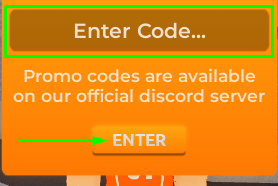
Standard redeem steps
- Launch Roblox and join Fluxo PVP on the account that should receive the reward
- Wait until you fully load into spawn - do not open menus during the streaming hitch
- Tap the gift icon on the bottom-left HUD, or walk into the Codigos interactable ring
- Select the text field labeled Enter Code (or similar localization)
- Paste the code exactly as listed - preserve capitalization
- Press ENTER and wait for a success or error toast
- Open inventory or currency UI to confirm coins / event guns arrived
PC-specific notes
On PC, mouse users can click the gift icon directly. If you use a controller on PC, highlight the icon with the virtual cursor or walk to the Codigos ring - physical proximity interactables are often more reliable than tiny HUD hitboxes when UI scale is increased. Keep the Roblox window focused; alt-tabbing mid-request can drop the redeem remote.
After a successful redeem, stay in-server for a few seconds. Some currency updates replicate slightly after the toast. If you immediately hop servers, you might think the reward vanished when it is still syncing.
Mobile-specific notes
Mobile layouts compress the HUD. If you cannot see the gift icon, rotate to landscape, lower UI scale in Roblox settings if available, or physically move to the Codigos ring in spawn - the world interactable does not depend on HUD real estate. Paste from your notes app rather than typing on a cramped keyboard; autocorrect loves breaking code strings.
Touch latency can make double-taps register as one. Tap ENTER once, wait, then check the toast. Spamming the button sometimes produces confusing duplicate error messages even when the first request succeeded.
Console-specific notes
Console players should prefer the Codigos ring when the gift icon is awkward with a stick cursor. Use the on-screen keyboard carefully; watch for accidental spaces at the end of the string. If your console account is linked through a different login than your PC main, redeem on the account you actually play competitive matches on - rewards do not jump between unlinked profiles.
Troubleshooting invalid or failed codes
| Symptom | Likely cause | What to try |
|---|---|---|
| Invalid code | Typo, expired, or wrong game list | Recopy from Active Codes; confirm status |
| Already redeemed | Code used on this account | Stop retrying; check inventory |
| No gift icon | UI scale / HUD clutter | Use Codigos ring; switch landscape on mobile |
| No toast at all | Network hiccup | Rejoin experience; retry once |
| Toast OK, no item | Replication delay | Wait 30s; check currency panel; rejoin once |
What to do after a successful redeem
Open your currency balance and inventory. If you received coins, plan unlocks with the Loadouts guide instead of impulse-buying. If you received an event gun, take it to AIMLAB for twenty headshot reps, then run two 1v1s before deciding it belongs in your serious kit. Seasonal guns can feel amazing in the menu and awkward in a live peek duel.
Finally, skim Updates & Events. Apology codes often ship beside lag fixes or map additions - knowing what changed that week helps you spend rewards on weapons that still match the live sandbox.
Grab the latest tracked strings and reward table.
Back to Active Codes- Keep a notes snippet of working codes you already redeemed to avoid duplicate attempts
- Redeem immediately when a trusted source posts - caps can be silent
- Teach faction mates the Codigos ring location so mobile players are not stuck
- Pair code farming days with a short AIMLAB warm-up so new guns get real reps
Redeeming is the easy part. Turning coins and event guns into round wins is the real game - continue into How to Play or the Beginner Path once your inventory updates.